One-click trade entries
Closed trades are listed under Trades to journal, ready for you to add with your own notes.
A journal only helps if you actually keep it. In The Tradeskill, each closed trade waits under Trades to journal, so adding it takes one click. All you add is the context: your setup, your reasoning and your state of mind at the time.
Closed trades are listed under Trades to journal, ready for you to add with your own notes.
Add your own context to each trade so patterns in your decision-making become visible over time.
Get an automatic read on what went well and what to improve on every closed position.
A trading journal records each trade and why you took it. Over time, it shows patterns you can’t see from memory, such as which setups lose money or whether you do worse after a loss. Most people remember their wins clearly and forget why they lost, which is exactly the problem a journal solves.
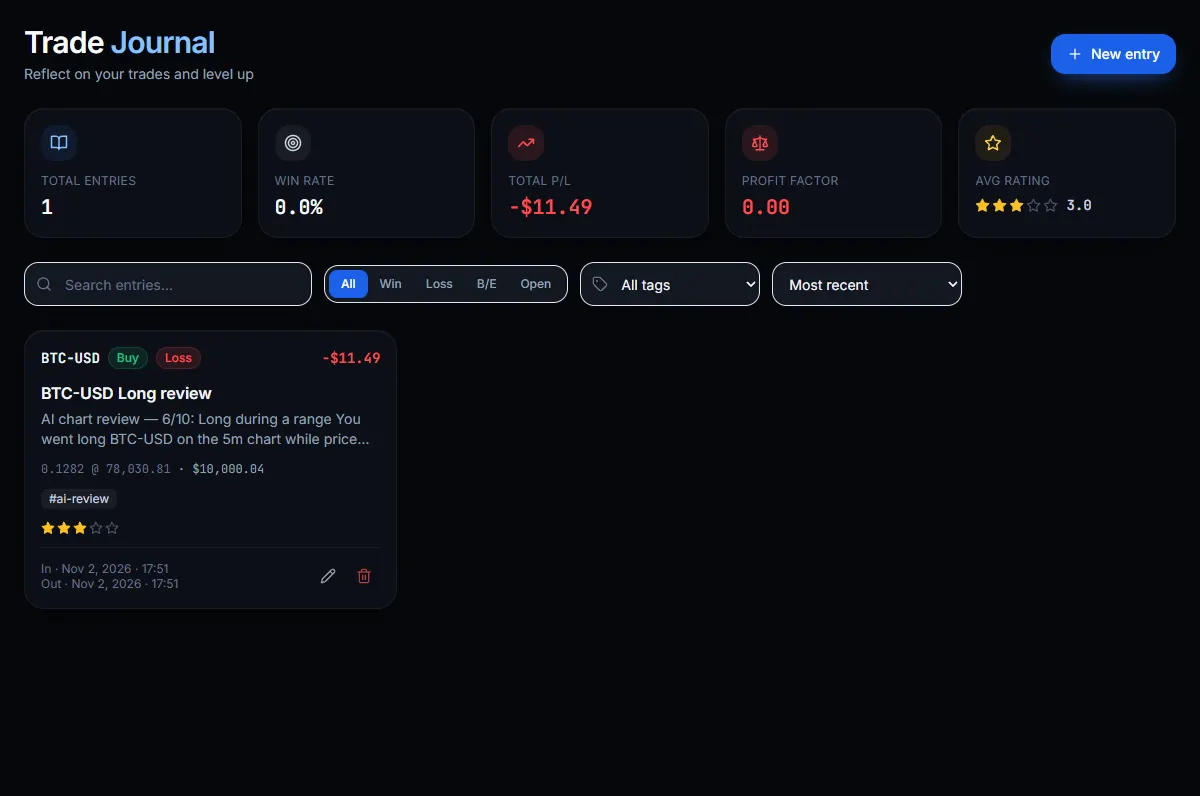
Trades don’t go into your journal automatically, and that’s deliberate: a journal is meant to include your own thinking. There are three ways of adding one.
| Field | Why it helps |
|---|---|
| Quantity, entry and exit prices, and P/L | The basic facts of the trade |
| Entry and exit times | Reveals time-of-day patterns |
| Strategy and setup | Lets you compare what works |
| Notes and tags | Your reasoning, in your own words |
| Mistakes and emotion | Exposes habits such as FOMO |
| Confidence and rating | Scores the decision, not the result |
| Chart image | Shows what you saw at the time |
The top of the page shows your total entries, win rate, total profit and loss, profit factor and average rating. You can filter by wins, losses, break-even trades and open trades, by tag, or sort by result.
Win rate alone can mislead you. In our Bitcoin moving-average test, a rule won just 27% of its trades in one period, but its average win (+18.0%) was so much bigger than its average loss (-5.0%) that it still averaged about +1.2% per trade. Meanwhile, a trader who wins 80% of the time but makes $50 per win and loses $300 per loss loses $20 per trade on average. Profit factor, which is total gains divided by total losses, shows that clearly: above 1.0 you’re ahead overall.
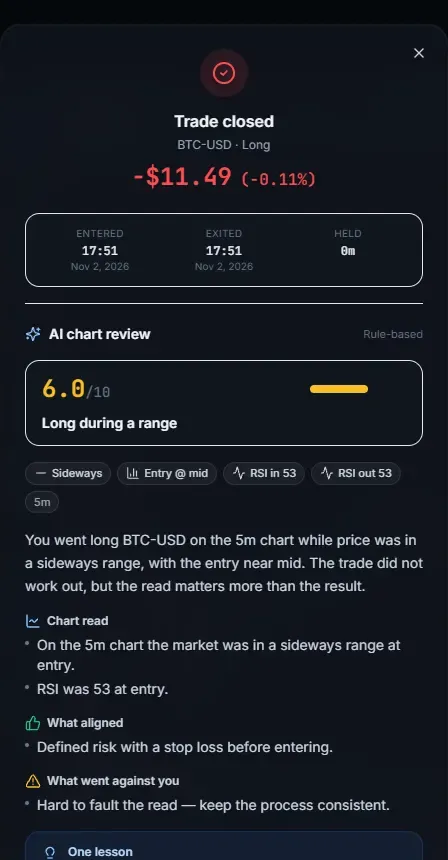
When you close a trade, you get a short review describing the chart, what aligned with your trade and what went against it. Use it as a prompt for your own thinking rather than as a verdict. It only looks at the trade’s figures and the surrounding candles, and it doesn’t know your plan.
Keep it simple enough that you’ll keep doing it. A reason, a result and one lesson is enough to begin with. The journal is part of a simulator and everything in it is virtual. It’s for education only and isn’t financial advice.